
Dominoes: Classic Dominos Game
NewPubCoBoard
4.78.50K Reviews
- Version
- 3.20.2
- Installs
- 10.00M
- Age Rating
- Everyone
Screenshots
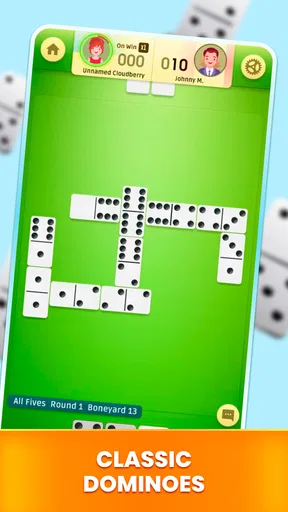

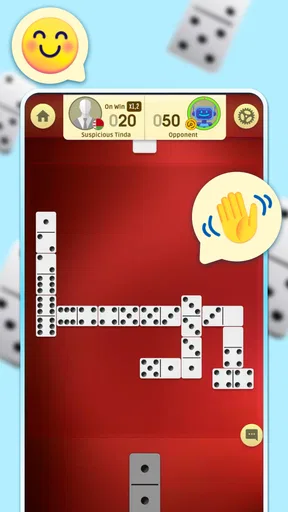

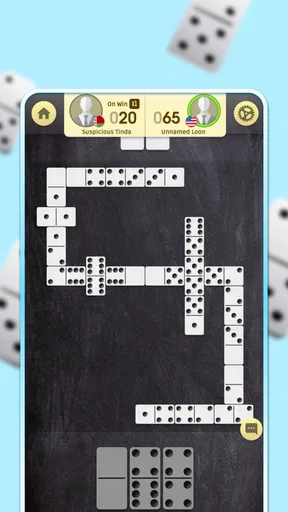
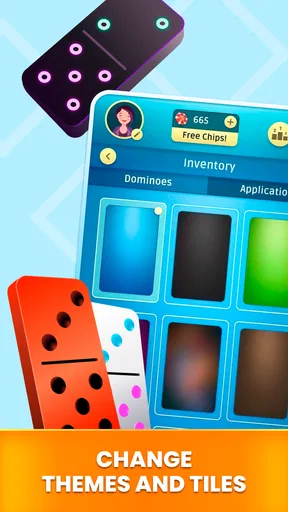


Our Review of Dominoes: Classic Dominos Game
 Analysis by Appyee
My first impression of Dominoes: Classic Dominos Game is that it aims to make a familiar tabletop pastime easy to pick up on a phone. That convenience is the main appeal: I can start a round without setting out tiles or finding someone nearby who is ready to play. It is a board game from NewPubCo, and its 4.7 average from around 256,000 ratings suggests that many players enjoy having dominoes close at hand. Still, I would judge it less by its popularity than by whether its play style fits the way you like to spend a spare few minutes.
Where setup and first moves can feel unclear
The basic idea of matching tile ends is familiar, but a digital game can make the first round feel different from playing across a table. You are looking at a screen rather than reading the whole layout in front of you, and a tap or drag may not feel as deliberate as placing a physical tile. I find it helps to slow down at the start and check what the game is asking before making a move, especially if I have switched between modes or changed a setting.
That is worth remembering if you are new to dominoes. The app can make it convenient to learn by playing, but convenience does not automatically explain every decision or rule. If a move seems unavailable, I would first check the open ends and the rules of the selected mode rather than assume the game has frozen. A brief pause to read the board can save the frustration of tapping repeatedly and losing track of the round.
Easy Setup and User-Friendly Interface
First things first, the installation process is a breeze. Available on both the Google Play Store and the App Store, downloading the app is as straightforward as it gets. Once you've got the app up and running, you'll be greeted by a clean, intuitive interface. The design is simple yet effective, making it easy to navigate through the different game modes and settings.
Upon launching the app, you’re welcomed with a choice of playing modes. Whether you want to tackle a solo game or challenge friends, the options are all laid out neatly. The graphics are crisp, and the animations are smooth, which adds to the overall enjoyable experience.
Checks that make a smoother start
Before settling into a longer session, I would take a moment to confirm that the chosen mode matches the kind of dominoes I want to play. Rules can change the feel of a round, so a familiar name does not always mean the same pace or decisions I expect. Starting with a short game is a sensible way to learn the controls and see whether the board presentation works for you before committing more time.
It also helps to think about the setting where you plan to play. On a quick break, I prefer a mode I already understand, because I can focus on the moves instead of learning rules while watching the clock. At home, a practice round is a better fit if I want to experiment with a less familiar option. Those small choices make the app easier to enjoy without assuming that every session needs to be competitive.
Game Modes Galore
This app doesn’t skimp on variety. You can choose from several game modes that cater to different styles of play. From Block Dominoes to Draw Dominoes, and even All Fives, each mode offers a unique twist on the classic game. I personally found myself gravitating towards the Block Dominoes mode, where strategy plays a huge role. But hey, to each their own!
If you’re someone who thrives on competition, the multiplayer mode is where it’s at. You can go head-to-head with friends or match up against random players online. The matchmaking is generally quick and hassle-free, so you won’t be left hanging around waiting for a game.
How to recover when a session goes sideways
If a round is interrupted or a move does not seem to register, I would avoid tapping several times in a row. First, give the screen a moment to respond and check whether the board has changed; repeated input can make it harder to tell what happened. If the game still feels stuck, returning to the main screen and starting a fresh round is a practical reset, though it may mean leaving the current game behind.
For online play, the other player’s connection and your own network can affect how responsive a match feels. If matchmaking takes longer than expected or a move appears delayed, checking that your connection is steady is a better first step than assuming the rules or your device are at fault. I would save online matches for a time when I can give them attention, and use a solo session when I need something that can be paused or abandoned without involving another player.
When the app may not be the problem
Some frustrations come from the situation rather than the game itself. A small screen can make tile positions harder to inspect, while interruptions, low battery, or an unreliable connection can break the rhythm of a match. If the controls feel awkward, try holding the device in a more comfortable position and making one deliberate selection at a time. I would also close other demanding tasks if the phone is already struggling, then see whether the game responds more smoothly.
There is a trade-off between digital convenience and the social side of a physical domino table. Playing against an online opponent gives you a match when nobody is nearby, but it cannot reproduce the conversation, shared pace, or tactile feel of setting tiles down together. A physical set is still the better choice for family gatherings or teaching someone face to face; this app is strongest when you want a compact solo or online option.
Perfect for Quick and Long Sessions
One of the standout features of Dominoes: Classic Dominos Game is its versatility in game length. Whether you have a few minutes to kill or want to settle in for a longer session, this app has got you covered. The quick match option lets you jump into a game instantly, while the more extended modes allow you to strategize and really sink your teeth into the gameplay.
The app also offers a practice mode, which is perfect for beginners or anyone looking to refine their skills. It’s a great addition that helps you get a feel for the game mechanics without the pressure of competing against others.
Choosing the right way to play
A realistic use for this game is a quiet wait between appointments: I can play a solo round rather than start a long mobile game that demands continuous attention. If I have more time, a longer session gives me room to compare how I approach Block, Draw, and All Fives. The useful habit is to choose the mode before the spare moment begins; browsing options while the clock is ticking can use up the very time I meant to fill.
For a beginner, practice is a low-pressure place to learn how tile choices affect what remains playable. For someone who already knows the game, switching modes can keep familiar rules from becoming repetitive. I would not treat every option as interchangeable, though: a mode that rewards careful planning may suit a patient player, while someone who wants a very casual distraction may prefer a quicker round and fewer decisions.
Compared with a typical single-mode domino app, the appeal here is the range of recognizable ways to play in one place. Compared with a physical set, it is easier to access and does not require another person in the room, but it loses the tactile and conversational parts of the game. If your priority is a shared family activity, a table and real tiles are more satisfying. If you want to practice alone or find an online opponent, the phone format is more convenient.
Customization with a practical purpose
Customization is a big part of what makes this app stand out. You can tweak the game settings to fit your preferences, whether it’s changing the difficulty level or altering the appearance of the domino tiles. The ability to adjust these settings ensures that the game feels personal and tailored to your liking.
If you're someone who enjoys personalizing your gaming experience, you'll appreciate the little touches that Dominoes: Classic Dominos Game offers, such as selecting different board themes and tile designs. It’s those small details that keep the game fresh and engaging.
Cost, ads, and what to expect
The game is free to install and rated for Everyone, so it is accessible to a broad range of players. It has passed 10 million installs, and the current version is 3.17.1; devices need Android 9 or later. In-app purchases range from $0.99 to $69.99 per item, so I would check the price of anything that catches my eye before confirming a purchase. The basic appeal is the domino play itself, not the need to buy extras.
Like many free-to-play apps, this one does include ads and offers in-app purchases. The ads are generally unobtrusive, appearing mostly between games rather than during play. If you find them bothersome, there’s an option to remove ads with a one-time purchase, which also unlocks additional features.
While the core game is accessible without spending a dime, there are some premium features, such as exclusive tile sets and additional game modes, that you can unlock through in-app purchases. These extras are nice to have but not essential, which is a refreshing change from other apps that push heavily for purchases.
Who will enjoy it, and who may want something else
I would recommend this to someone who already likes dominoes, wants a convenient way to practice, or enjoys switching between familiar rule variations. It also suits a casual player who wants a board game that can fit around a busy day rather than requiring a planned gathering. The short-session option is particularly useful when I want to play a little without turning a break into a commitment.
I would steer away from it if you want a deeply social experience, a physical game night, or a mobile game with a very different kind of challenge. People who dislike ads or prefer not to encounter optional purchases may also find the free-to-play structure irritating, even if those extras are not necessary for the basic play. And if you are unfamiliar with domino rules, the practice option can help, but learning alongside a patient person may be clearer than learning through a screen alone.
Ads and In-App Purchases
Like many free-to-play apps, this one does include ads and offers in-app purchases. The ads are generally unobtrusive, appearing mostly between games rather than during play. If you find them bothersome, there’s an option to remove ads with a one-time purchase, which also unlocks additional features.
While the core game is accessible without spending a dime, there are some premium features, such as exclusive tile sets and additional game modes, that you can unlock through in-app purchases. These extras are nice to have but not essential, which is a refreshing change from other apps that push heavily for purchases.
Final Thoughts
In a world saturated with mobile games, Dominoes: Classic Dominos Game stands out by offering a simple yet engaging experience. It captures the essence of traditional dominoes while adding modern features that enhance gameplay. Whether you’re a seasoned player or just looking to pass the time, this app is a fantastic choice.
What I love most is its flexibility. You can play a quick game during a break or dive into a longer session without feeling pressured. The user-friendly interface, coupled with the variety of game modes, makes it suitable for players of all levels.
So, if you're ready to stack those tiles and strategize your way to victory, give Dominoes: Classic Dominos Game a try. It's a classic experience with a modern twist, right in the palm of your hand.
My practical advice is to begin with a familiar mode, try a practice round if you are still learning, and decide for yourself whether the free version’s ad breaks bother you before considering any purchase. I would choose online play when I have a stable connection and enough time to finish a match, and solo play when I need a flexible distraction. That simple distinction helps set the right expectations.
Overall, this is a handy way to keep several domino variations within reach, not a replacement for every kind of board-game session. Its strongest fit is the player who values quick access, solo practice, and the option of a match with someone else. If that is what you want from a phone game, I think it is worth trying; if the main point for you is sharing a table and conversation, bring out the real tiles instead.
Verdict
Strengths of Dominoes: Classic Dominos Game
- Intuitive controls make gameplay easy.
- Variety of game modes available.
- Offline play supports no internet use.
- Customizable themes enhance experience.
- Lightweight app with quick download.
Limitations of Dominoes: Classic Dominos Game
- Ads can be intrusive at times.
- Limited social features for players.
- AI opponents can be predictable.
- In-app purchases may be costly.
- Graphics are basic, lack flair.
Other Releases by NewPubCo
View All


Similar Picks in This Category
View All
Ludo King®
Gametion4.1

Ludo
Yarsa Games4.6

Tile Master® - Matching Game
Higgs Studio3.6

Checkers Online
CC Games4.6

Dominoes
Loop Games4.7

Chess
Chess Prince4.6
Frequently Asked Questions
What are the main features of Dominoes: Classic Dominos Game?
Dominoes: Classic Dominos Game offers a variety of gameplay modes, including Block, Draw, and All Fives. It features both single-player and multiplayer options, allowing you to play with friends or against the AI. The game also includes customizable boards and tiles, as well as detailed statistics to track your progress.
Is Dominoes: Classic Dominos Game free to play?
Yes, Dominoes: Classic Dominos Game is free to download and play. However, it may contain in-app purchases and ads. These are optional and are designed to enhance the gaming experience, such as purchasing additional themes or removing ads for uninterrupted gameplay.
Can I play Dominoes: Classic Dominos Game offline?
Yes, Dominoes: Classic Dominos Game can be played offline. You can enjoy single-player mode without an internet connection, making it perfect for travel or situations where Wi-Fi isn’t available. For multiplayer features, an internet connection is required to connect with other players.
What platforms is Dominoes: Classic Dominos Game available on?
Dominoes: Classic Dominos Game is available on both Android and iOS platforms. You can download it from the Google Play Store for Android devices and the Apple App Store for iOS devices. Ensure your device meets the minimum system requirements for optimal performance.
How does the scoring system work in Dominoes: Classic Dominos Game?
The scoring system in Dominoes: Classic Dominos Game varies depending on the mode you choose. In All Fives, players score points by making the open ends of the layout a multiple of five. In Block and Draw modes, the objective is to empty your hand and block your opponent's moves, with points awarded based on remaining tiles.
Play our best games!


